Overview
Evaluating search APIs requires careful methodology to ensure fair, reproducible comparisons. This guide provides a framework for assessing Exa’s search capabilities across multiple dimensions:
- Retrieval Quality: Accuracy and relevance of returned results
- Latency: Response time from query to results
- Freshness: Ability to retrieve up-to-date information
- Cost Efficiency: Value delivered per API call
- Agentic Suitability: Performance in multi-step reasoning workflows
Exa is designed to excel across different use cases:
- Deep Research: Multi-hop queries requiring comprehensive context and query expansion
- Agentic Workflows: Complex tasks involving multiple search iterations and reasoning steps
- Low-Latency QA: Fast factual question-answering for real-time applications
- Semantic Discovery: Finding conceptually related content beyond keyword matching
Best Practice: Start with Defaults
The most important recommendation for fair evaluation: use Exa’s default settings.
Adding restrictive parameters (date filters, domain restrictions, text inclusion/exclusion) often causes agents to over-optimize in non-meaningful ways, unnecessarily limiting results and reducing quality without providing valuable insights. Unless your evaluation specifically tests a filtered use case, avoid adding constraints that don’t reflect real-world usage.
Recommended minimal configuration:
# Option 1: Use text with character limit (recommended for consistent comparisons)
exa.search_and_contents(
    query,
    type="fast",  # or "auto" (for `Deep`, see Option 2)
    num_results=10,
    text={"max_characters": 5000}
)

# Option 2: Use context string for RAG (single string with total max characters)
# Note: `Deep` search may require context=True to return results
# exa.search_and_contents(
#     query,
#     type="deep",
#     additional_queries=["variation 1", "variation 2"],  # Optional query variations
#     num_results=10,
#     context={"max_characters": 20000}
# )

# Option 3: Use full text (may result in very long content)
# exa.search_and_contents(
#     query,
#     type="fast",
#     num_results=10,
#     text=True
# )
max_characters ensures fair comparisons by standardizing content length across all queries. The context parameter returns a single RAG-ready string, while text returns individual content for each result. Note: Deep search may require context=True to return detailed summaries. Only add additional parameters (date filters, domain restrictions, etc.) when they’re essential to your specific evaluation objective.
Compare Within Latency Classes
Critical: Always find the closest competitor in terms of P50 latency for meaningful comparisons.
Don’t compare systems with vastly different latency profiles — a 500ms API serves different use cases than a 5000ms API. Instead, benchmark within similar latency ranges:
- For Exa Fast (<500ms): Compare to other sub-1s APIs with similar latency
- For Exa Auto (~1s): Compare to mid-latency systems (800ms-1500ms)
- For Exa Deep (>2s): Compare to other multi-second agentic/research systems
Comparing across latency classes (e.g., Fast vs Deep) is not meaningful — they’re optimized for different requirements and use cases.
Search Types: Understanding the Quality-Latency Spectrum
Exa offers four search types, each optimized for different evaluation scenarios:
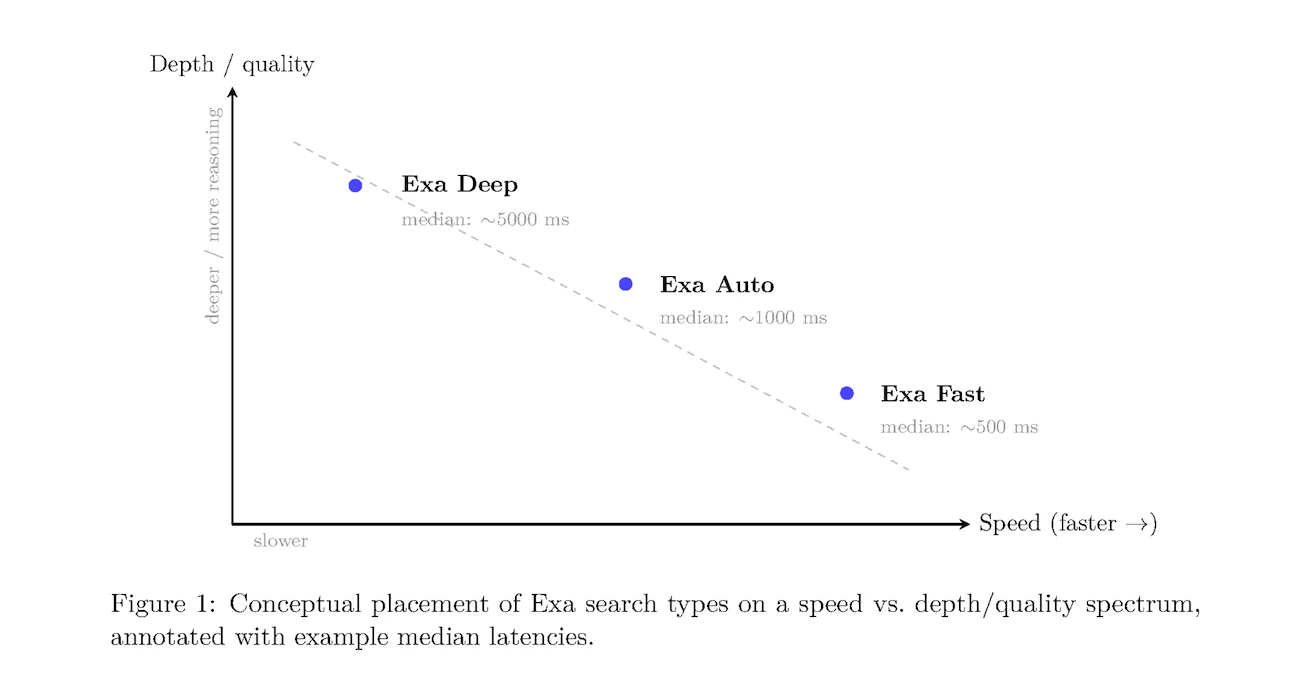
Fast Search
Optimized for: Speed-critical applications
Characteristics:
- Median latency: ~500ms (excluding network and optional features)
- Streamlined neural and reranking models
- Best for single-step factual queries
When to benchmark with Fast:
- Low-latency QA datasets (SimpleQA, WebWalkerQA)
- Real-time applications (voice agents, autocomplete)
- High-volume agentic workflows where latency accumulates
Example configuration:
result = exa.search_and_contents(
    "latest AI breakthroughs in 2025",
    type="fast",
    num_results=10,
    text={"max_characters": 5000}
)
Auto Search (Default)
Optimized for: Balanced performance without manual tuning
Characteristics:
- Median latency: ~1000ms
- Intelligently combines multiple search methods
- Reranker model adapts to query type
When to benchmark with Auto:
- General-purpose search evaluations
- When query types vary significantly
- Production workloads requiring versatility
Example configuration:
result = exa.search_and_contents(
    "companies building climate tech solutions",
    type="auto",  # or omit - auto is default
    num_results=10,
    text={"max_characters": 5000}
)
Deep Search
Optimized for: Comprehensive research and multi-hop queries
Characteristics:
- Median latency: ~5000ms
- Automatic query expansion or custom query variations via
additional_queries (Python) / additionalQueries (JavaScript)
- Rich contextual summaries for each result (requires
context=True)
- Parallel search across multiple query formulations
Using query variations: Provide 2-3 query variations using additional_queries (Python) or additionalQueries (JavaScript) for best results. If not provided, Deep search will automatically generate variations.
- Agentic workflows (FRAMES, MultiLoKo, BrowseComp)
- Complex research tasks requiring multiple perspectives
- Scenarios where comprehensive coverage matters more than speed
Example configuration:
result = exa.search_and_contents(
    "impact of quantum computing on cryptography",
    type="deep",
    additional_queries=[
        "quantum threats to encryption",
        "post-quantum cryptography research"
    ],
    num_results=10,
    text=True,
    context=True  # Required for `Deep` search summaries
)
Neural Search
Optimized for: Semantic similarity and exploratory queries
Characteristics:
- Embeddings-based next-link prediction
- Excels at thematic and conceptual relationships
- Incorporated into Fast and Auto search types
When to benchmark with Neural:
- Exploratory search tasks
- Finding semantically related content
- Long-form query matching
For evaluating Exa in agentic workflows where LLMs autonomously call search tools, proper tool calling setup is critical. Tool calling allows agents to dynamically invoke Exa search based on user queries and reasoning steps.
When benchmarking agentic systems:
- Agents decide when to search: The LLM determines if/when to call Exa based on the task
- Dynamic parameter selection: Agents may choose search parameters (though we recommend minimal defaults)
- Multi-step workflows: Agents can make multiple Exa calls in sequence or parallel
- Keep tool definitions minimal: Don’t expose too many parameters to the agent — this encourages over-filtering
- Use consistent tool schemas: Standardize tool definitions across all evaluated systems
- Monitor tool call patterns: Track how often and when agents invoke Exa vs competitors
Implementation Guides
See our detailed guides for implementing Exa with popular LLM providers:
These guides show how to define Exa search as a tool and handle the agent’s tool call responses properly.
Evaluation Methodology
Core Principles for Fair Benchmarking
To ensure reproducible, meaningful comparisons:
-
Use default settings: Start with minimal parameters (
type, num_results, text). Avoid adding restrictive filters (date ranges, domains, text inclusion/exclusion) unless they’re core to your evaluation — these often cause over-optimization that artificially limits results without meaningful benefit.
-
Standardize queries: Use identical query sets across all systems
-
Control downstream processing: Use the same LLM for answer synthesis and grading
-
Disable prompt engineering: Evaluate base API performance without query optimization
-
Measure consistently: Track P50 latency, accuracy, and coverage using identical metrics
-
Document configurations: Record all parameter settings for reproducibility
Four-Phase Evaluation Workflow
Phase 1: Scope Definition
Define evaluation objectives:
- What capabilities are you testing? (factual QA, research depth, freshness, etc.)
- What latency requirements matter for your use case?
- Are you evaluating single-step retrieval or multi-step agentic workflows?
Phase 2: Dataset Selection
Choose benchmarks aligned with your scope (see Datasets section below):
- Low-latency factual QA: SimpleQA, WebWalkerQA
- Single-step retrieval: FRAMES (single-step slice), Seal0
- Agentic workflows: FRAMES (agentic slice), MultiLoKo, BrowseComp
- Complex reasoning: HLE (hard, long, emerging questions)
- Freshness: FreshQA, time-sensitive queries
Phase 3: Run Configurations
Execute standardized retrieval-synthesis-grading loop:
# 1. Retrieval step
results = exa.search_and_contents(
    query,
    type="fast",  # or "auto", "deep"
    num_results=10,
    text={"max_characters": 5000}
)

# 2. Answer synthesis (downstream LLM restricted to retrieved context)
context = "\n\n".join([r.text for r in results.results])
answer = llm.generate(
    f"Answer the question using only the provided context.\n\n"
    f"Context: {context}\n\n"
    f"Question: {query}\n\n"
    f"Answer:"
)

# 3. Grading (LLM-based correctness evaluation)
grade = grading_llm.evaluate(
    question=query,
    expected_answer=ground_truth,
    generated_answer=answer
)
# Returns: "correct", "partial", or "incorrect"
Phase 4: Results Analysis
Aggregate metrics:
- Accuracy: Percentage of correct answers
- Partial-credit accuracy: Weighted score (e.g., correct=1.0, partial=0.5, incorrect=0.0)
- Retrieval coverage: Percentage of queries where relevant information was retrieved
- P50 latency: Median response time across all queries
- Cost per query: Total API cost divided by number of queries
Optimal Exa Settings for Evaluation
Configuration Parameters
| Parameter | Purpose | Evaluation Recommendations |
|---|
type | Search method | Match to benchmark type (fast/auto/deep) |
num_results | Number of results | Fix at 10 for consistency across comparisons |
text | Retrieve full content | Set to true for RAG-style evaluation |
context | Get AI-generated summaries | Set to true for Deep search |
livecrawl | Real-time web fetching | Default "fallback" is recommended; use "preferred" for freshness tests |
additional_queries / additionalQueries | Query variations (Deep only) | Provide 2-3 variations for best Deep search results. Use additional_queries in Python, additionalQueries in JavaScript |
Recommended Configuration Templates
Fast-Baseline Configuration
For latency-sensitive evaluations:
result = exa.search_and_contents(
    query,
    type="fast",
    num_results=10,
    text={"max_characters": 5000}
)
Auto-Quality Configuration
For balanced evaluations:
result = exa.search_and_contents(
    query,
    type="auto",
    num_results=10,
    text={"max_characters": 5000}
)
Deep-Comprehensive Configuration
For agentic and research evaluations:
result = exa.search_and_contents(
    query,
    type="deep",
    additional_queries=[variation1, variation2],
    num_results=10,
    text=True,
    context=True,
    livecrawl="fallback"
)
Choosing Datasets for Evaluation
Benchmark-to-Search-Type Mapping
| Benchmark | Description | Recommended Search Type | Focus Area |
|---|
| SimpleQA | Single-step factual questions | Fast, Auto | Low-latency QA accuracy |
| FRAMES (single-step) | Straightforward retrieval tasks | Fast, Auto | Single-hop retrieval quality |
| FRAMES (agentic) | Multi-step reasoning requiring iteration | Deep | Agentic workflow performance |
| MultiLoKo | Multi-hop knowledge queries | Deep | Complex reasoning chains |
| BrowseComp | Web browsing comprehension | Deep | Context understanding |
| Seal0 | General search quality | Fast, Auto, Deep | Overall performance |
| WebWalkerQA | Navigation-style queries | Fast, Auto | Real-world search scenarios |
| HLE | Hard, long, emerging questions | Deep | Difficult edge cases |
| FreshQA | Time-sensitive queries | All types with livecrawl="preferred" | Freshness/timeliness |
Dataset Characteristics
SimpleQA
- Purpose: Tests fast, factual question-answering
- Query style: “What is the capital of France?”, “Who invented the telephone?”
- Evaluation focus: Accuracy and latency for straightforward queries
- Exa configuration: Fast search with cached content
FRAMES
- Purpose: Evaluates both single-step and multi-step retrieval
- Two slices:
- Single-step: Direct queries answerable from one search
- Agentic: Complex queries requiring multiple search iterations
- Evaluation focus: Versatility across task complexity
- Exa configuration:
Fast/Auto for single-step, Deep for agentic
MultiLoKo & BrowseComp
- Purpose: Multi-hop reasoning and deep comprehension
- Query style: Questions requiring synthesis across multiple sources
- Evaluation focus: Quality of context and reasoning support
- Exa configuration:
Deep search with query expansion
Seal0
- Purpose: General search quality benchmark
- Query style: Diverse real-world queries
- Evaluation focus: Overall retrieval accuracy
- Exa configuration: All search types (compare performance)
HLE (Hard, Long, Emerging)
- Purpose: Stress-test with difficult queries
- Query style: Complex, lengthy queries about recent topics
- Evaluation focus: Handling edge cases and emerging information
- Exa configuration:
Deep search with livecrawling
Benchmark Results
Low-Latency Search Engines
Performance on speed-critical tasks (latency <1s):
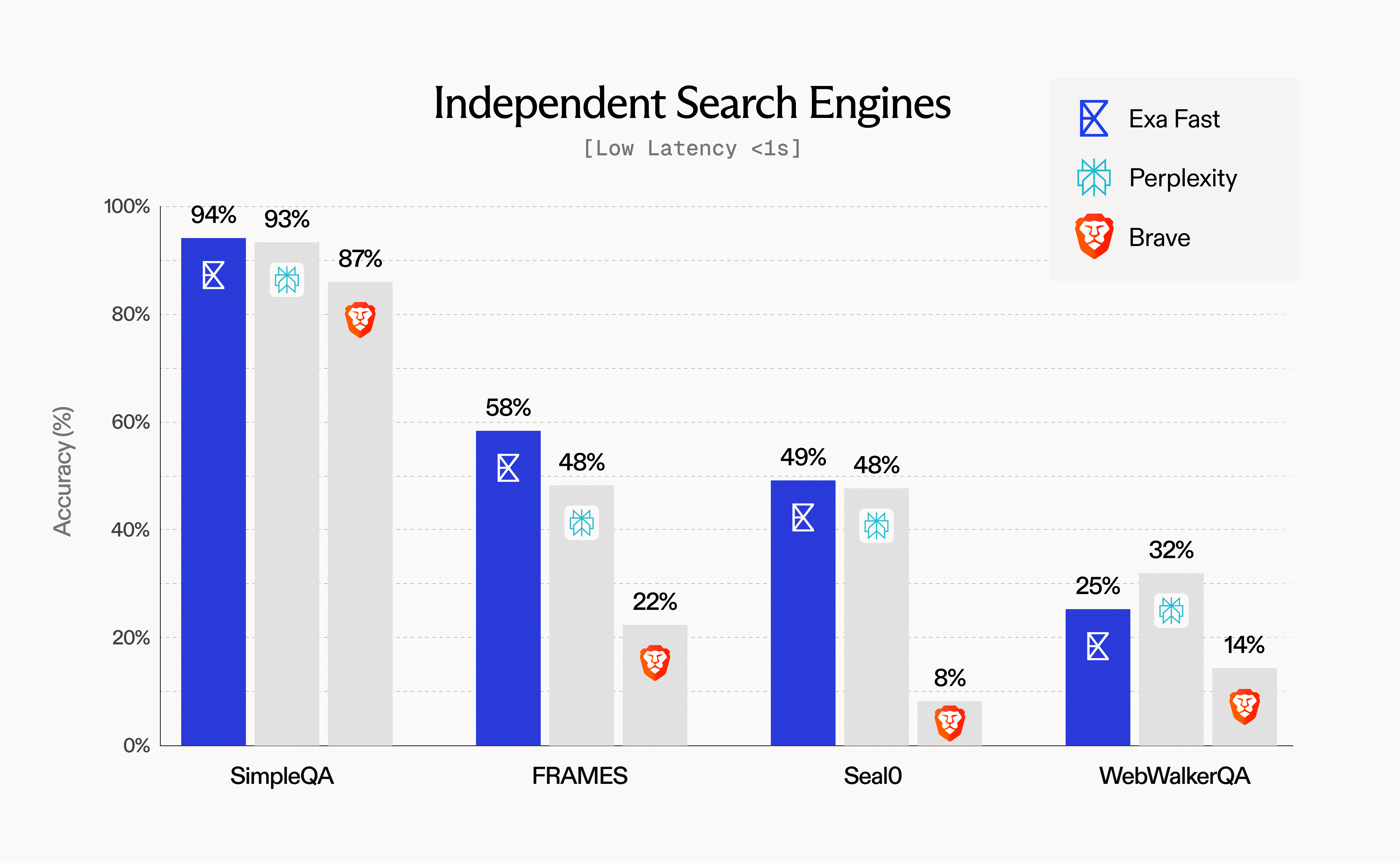 Key findings:
- Exa Fast achieves 94% accuracy on SimpleQA with median latency <500ms
- Strong performance across multiple benchmarks while maintaining speed advantage
- Ideal for real-time applications and high-volume agent workflows
Agentic Search APIs
Performance on complex, multi-step tasks (latency >2s):
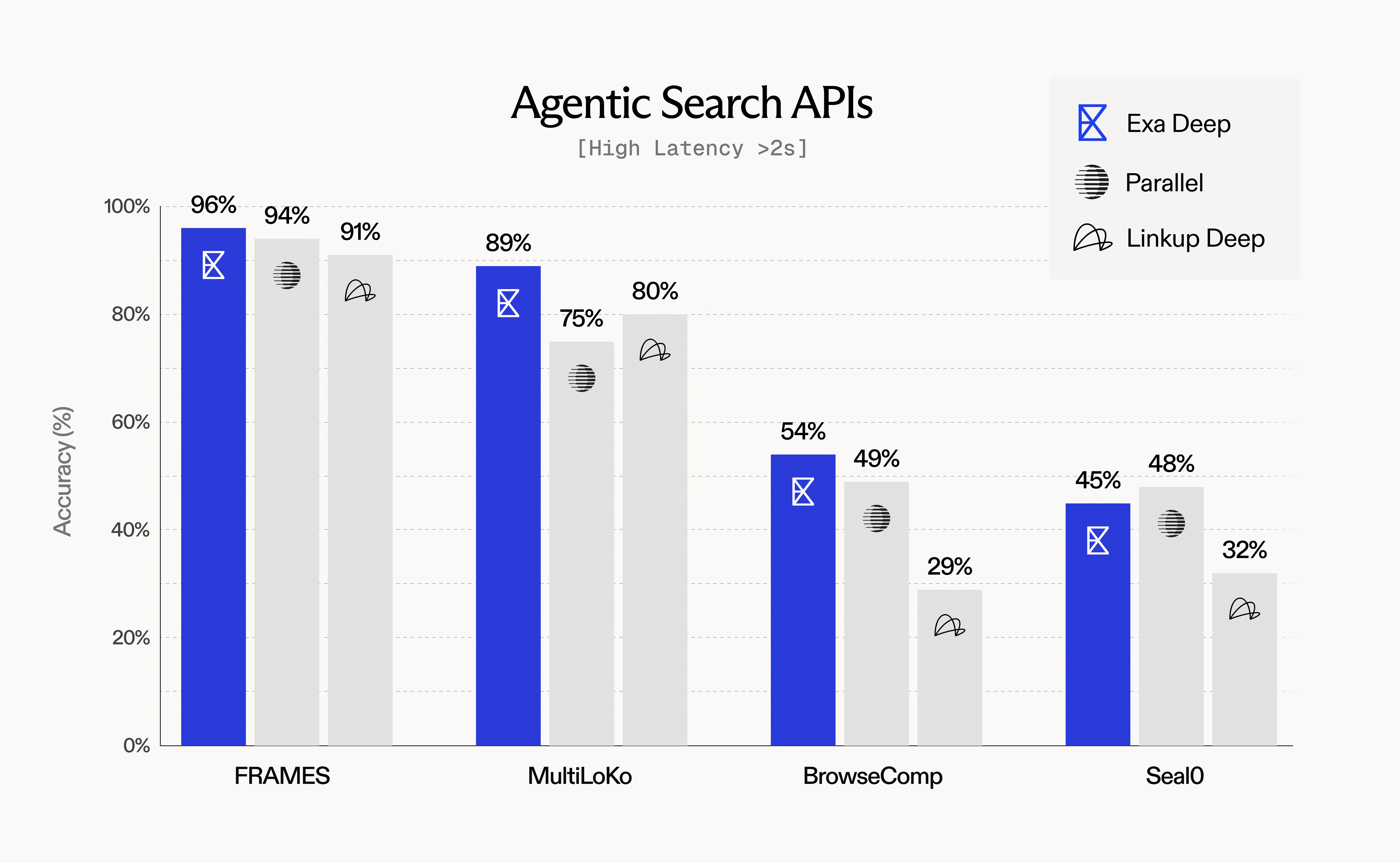 Key findings:
- Exa Deep leads on FRAMES (96%) and MultiLoKo (89%) benchmarks
- Query expansion and rich context enable superior agentic performance
- Higher latency justified by comprehensive, high-quality results
Quality-Latency Tradeoffs
Understanding the Spectrum
Different use cases require different points on the quality-latency spectrum:
| Use Case | Priority | Recommended Type | Expected Latency | Quality Characteristics |
|---|
| Voice agents | Speed | Fast | <500ms | Good factual accuracy |
| Chatbot grounding | Balanced | Auto | ~1000ms | Versatile, high quality |
| Research assistant | Depth | Deep | ~5000ms | Comprehensive, multi-faceted |
| Batch enrichment | Quality | Deep | ~5000ms | Maximum coverage |
| Real-time autocomplete | Speed | Fast | <500ms | Relevant suggestions |
Interpreting Tradeoffs
When analyzing evaluation results:
-
Don’t compare across latency classes:
Fast search at 500ms vs Deep search at 5000ms serve different purposes. Always find the closest competitor in terms of latency for meaningful comparisons — compare systems with similar P50 latency ranges.
-
Benchmark within peer groups:
- Compare Exa Fast (<500ms) to other sub-1s APIs
- Compare Exa Auto (~1s) to similar mid-latency systems
- Compare Exa Deep (>2s) to other agentic/research-oriented systems
-
Consider total workflow time: For multi-step agents,
Fast search may complete the entire workflow faster than Deep search on a single query
-
Account for quality requirements: If accuracy >90% is required, accept higher latency; if <1s is required, accept some quality tradeoff
Factors That Impact Latency
Beyond search type selection, several parameters affect response time:
| Parameter | Latency Impact | Recommendation |
|---|
livecrawl="preferred" | +500-2000ms | Use only when freshness is critical |
livecrawl="fallback" | Variable | Balanced freshness/speed (default) |
| AI-generated summaries | +300-800ms | Evaluate necessity vs speed |
num_results > 10 | +50-200ms | Keep at 10 for fair comparisons |
| Complex date filters | +100-300ms | Simplify when possible |
Text filtering (include_text, exclude_text) | +100-500ms | Use sparingly |
Running Production-Grade Evaluations
Example: SimpleQA Evaluation Script
from exa_py import Exa
import json
from datetime import datetime

exa = Exa(api_key="YOUR_API_KEY")

def evaluate_simpleqa(dataset_path, config):
    """
    Run SimpleQA evaluation with specified configuration.

    Args:
        dataset_path: Path to SimpleQA JSON file
        config: Dict with keys: type, num_results, text, livecrawl
    """
    with open(dataset_path) as f:
        questions = json.load(f)

    results = []
    latencies = []

    for item in questions:
        query = item['question']
        ground_truth = item['answer']

        # Retrieval
        start = datetime.now()
        search_result = exa.search_and_contents(
            query,
            type=config['type'],
            num_results=config['num_results'],
            text=config['text'],
            livecrawl=config['livecrawl']
        )
        latency = (datetime.now() - start).total_seconds() * 1000
        latencies.append(latency)

        # Synthesis (using your LLM)
        context = "\n\n".join([r.text for r in search_result.results])
        answer = your_llm.generate(
            f"Answer concisely using only the context.\n\n"
            f"Context: {context}\n\n"
            f"Question: {query}\n\n"
            f"Answer:"
        )

        # Grading (using your grading LLM)
        grade = grading_llm.evaluate(
            question=query,
            expected=ground_truth,
            generated=answer
        )

        results.append({
            'query': query,
            'grade': grade,
            'latency_ms': latency
        })

    # Calculate metrics
    accuracy = sum(1 for r in results if r['grade'] == 'correct') / len(results)
    p50_latency = sorted(latencies)[len(latencies) // 2]

    return {
        'accuracy': accuracy,
        'p50_latency_ms': p50_latency,
        'total_queries': len(results),
        'config': config
    }

# Run evaluation
config = {
    'type': 'fast',
    'num_results': 10,
    'text': {'max_characters': 5000}
}

results = evaluate_simpleqa('simpleqa.json', config)
print(f"Accuracy: {results['accuracy']:.2%}")
print(f"P50 Latency: {results['p50_latency_ms']:.0f}ms")
Multi-Configuration Comparison
Best practice: Run multiple configurations to understand tradeoffs:
configs = [
    {'name': 'Fast', 'type': 'fast'},
    {'name': 'Auto', 'type': 'auto'},
    {'name': 'Deep', 'type': 'deep'},
]

for config in configs:
    results = evaluate_simpleqa('simpleqa.json', config)
    print(f"{config['name']}: {results['accuracy']:.1%} @ {results['p50_latency_ms']:.0f}ms")
`Fast`: 94.2% @ 450ms
`Auto`: 95.8% @ 1050ms
`Deep`: 97.2% @ 4950ms
Recommendations
For Low-Latency QA Benchmarks
Datasets: SimpleQA, WebWalkerQA, Seal0 (single-step)
Configuration:
- Use
type="fast" or type="auto"
- Fix
num_results=10
- Use
text={"max_characters": 5000} for consistent context length
Expected performance:
- Accuracy: 90-95% on factual queries
- Latency: 400-600ms (Fast), 900-1200ms (Auto)
For Agentic Workflow Benchmarks
Datasets: FRAMES (agentic), MultiLoKo, BrowseComp, HLE
Configuration:
- Use
type="deep"
- Provide 2-3 query variations via
additional_queries (Python) / additionalQueries (JavaScript) for best results
- Enable
context=True for rich summaries
- Set
livecrawl="fallback" for freshness
For tool calling evaluations: See the Evaluating Exa with Tool Calling section below for guidance on setting up agents to autonomously invoke Exa search.
Expected performance:
- Accuracy: 85-96% on complex multi-hop queries
- Latency: 4000-6000ms
- Higher comprehensive coverage vs single-query search
For Freshness Benchmarks
Datasets: FreshQA, time-sensitive custom queries
Configuration:
- Use any search type based on latency requirements
- Set
livecrawl="preferred" or livecrawl="fallback"
- Include recent date filters if needed
Expected performance:
- Freshness: Up-to-date information from recent sources
- Latency: +500-2000ms vs cached content
For Production Deployment
- Run comparative benchmarks across
Fast, Auto, and Deep to understand your quality-latency frontier
- Match search type to use case:
- Real-time user-facing:
Fast
- General chatbot/assistant:
Auto
- Deep research/agent workflows:
Deep
- Monitor in production: Track accuracy, latency, and cost metrics continuously
- Optimize parameters: Adjust
livecrawl, num_results, and content options based on actual usage patterns
- Document your evaluation: Record configurations, datasets, and results for reproducibility
For Meaningful Cross-System Comparisons
- Standardize everything:
- Identical query sets
- Same downstream LLM for synthesis
- Same grading model/rubric
- Fixed
num_results across systems
- Compare within latency classes — find the closest competitor in terms of P50 latency:
- For Exa Fast (<500ms): Compare to other sub-1s APIs with similar latency
- For Exa Auto (~1s): Compare to mid-latency systems (800ms-1500ms)
- For Exa Deep (>2s): Compare to other multi-second agentic/research systems
- Account for feature differences:
- Some systems don’t offer content retrieval
- Some don’t support livecrawling
- Some have different context limits
- Measure what matters for your use case:
- If latency <500ms is required, only benchmark Fast-class systems
- If accuracy >95% is required, accept higher latency configurations
Additional Resources
For questions about evaluation methodology or custom benchmark needs, join our Discord community or reach out to our team.